idverifyby Eboracum

Digital staff ID · live verification

Prove who's at the door in seconds.

idverify gives every member of your team a digital ID card with a live QR code. Anyone can scan it and see straight away whether that person really works for you, today, right now. When someone leaves, their card stops working.

No appScan with any phone camera
LiveWithdrawn cards fail instantly
No signal?Signed offline check
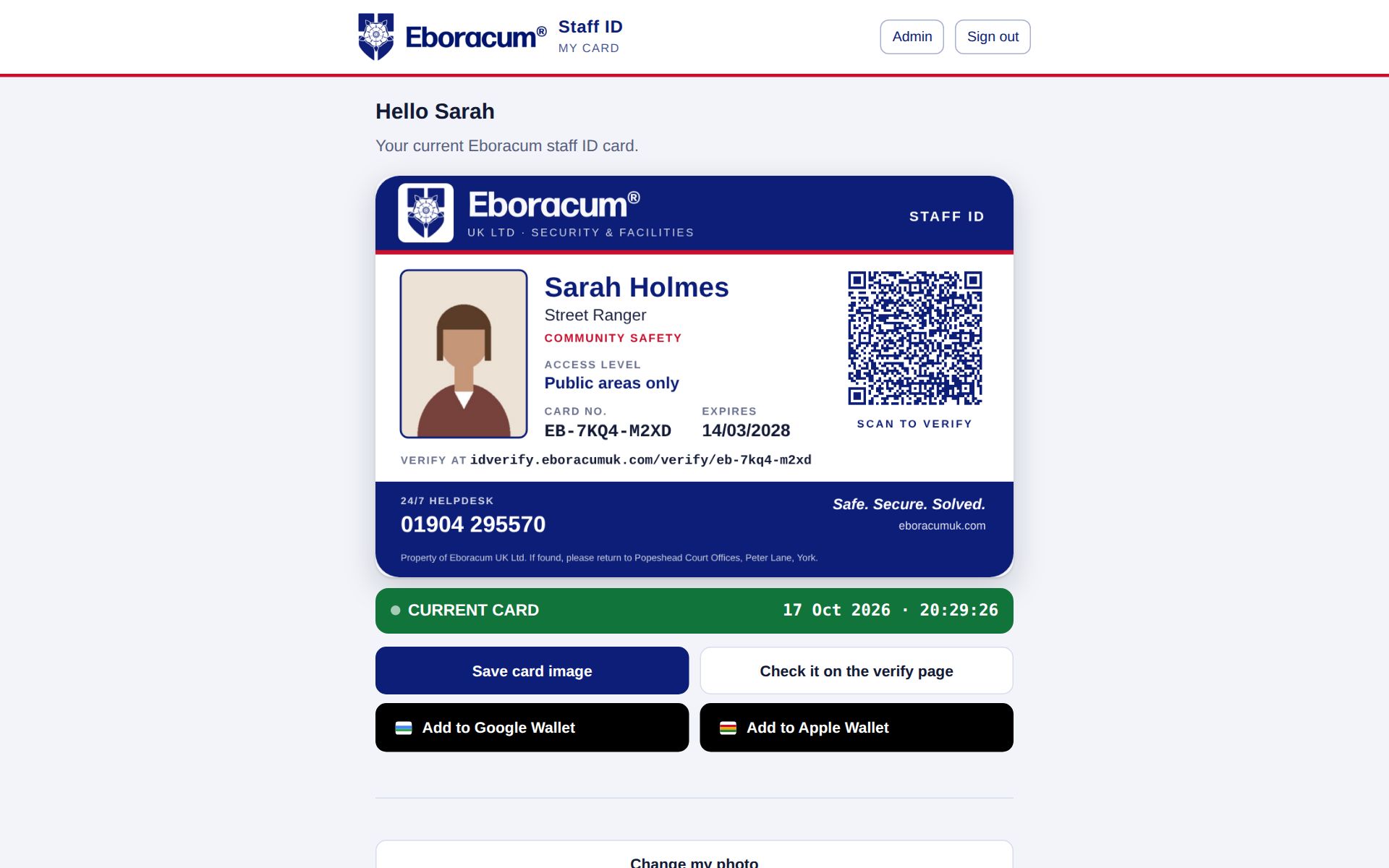
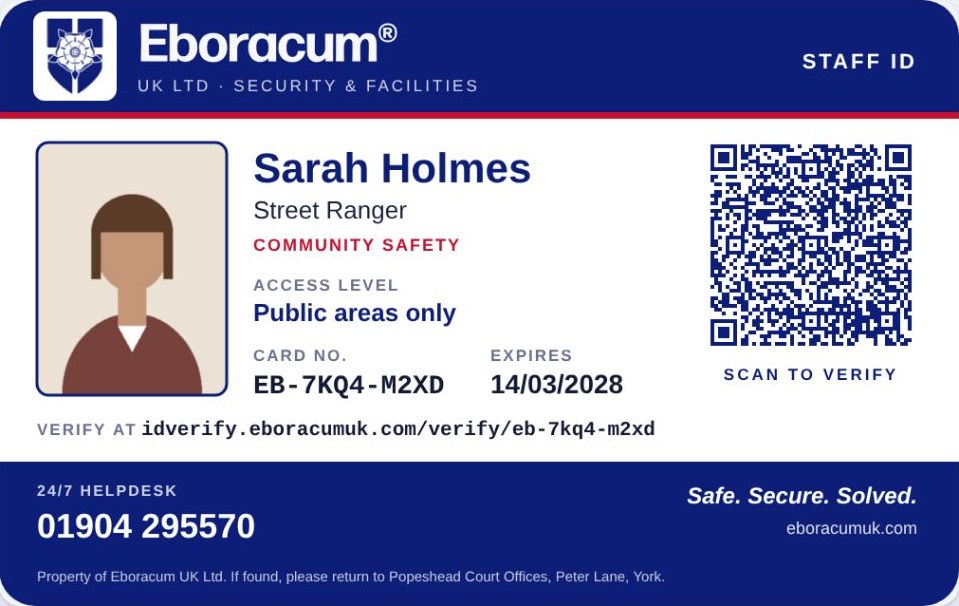
Eboracum staff ID card for Sarah Holmes, Street Ranger
Verify page on a phone showing VERIFIED

If you manage a team

Run every ID card from one screen

  • Issue a card in under a minute, or a whole team from a spreadsheet
  • Withdraw a card and it fails everywhere straight away, wallet passes included
  • Temporary passes for agency and event staff that switch themselves off
  • A one-click report for your SIA ACS assessment
Jump to the manager's guide →

If you're looking to buy

Stop worrying about fake and leftover IDs

  • Live, scannable ID for security, facilities and field teams
  • Nothing to install for your staff, clients or the public
  • Hosted in London, with privacy built in from the start
  • Connects to your HR or CRM to withdraw leavers' cards automatically
See what's included →

Why it matters

A plastic card can't tell anyone that its holder left last month.

Leavers keep their cardsPrinted IDs stay in wallets long after the last shift. A live card stops working the moment it's withdrawn.
Fakes are easyA convincing card takes minutes to print. A QR code that checks your own live register can't be forged.
Screenshots fool peopleThe verify page shows a ticking clock and a moving band, so a still image of a past check stands out.
Auditors want evidenceEvery issue, renewal and withdrawal is logged, and the ACS report pulls it together for you.

STOP 01 · THE CARD

A proper ID card, on screen and in print

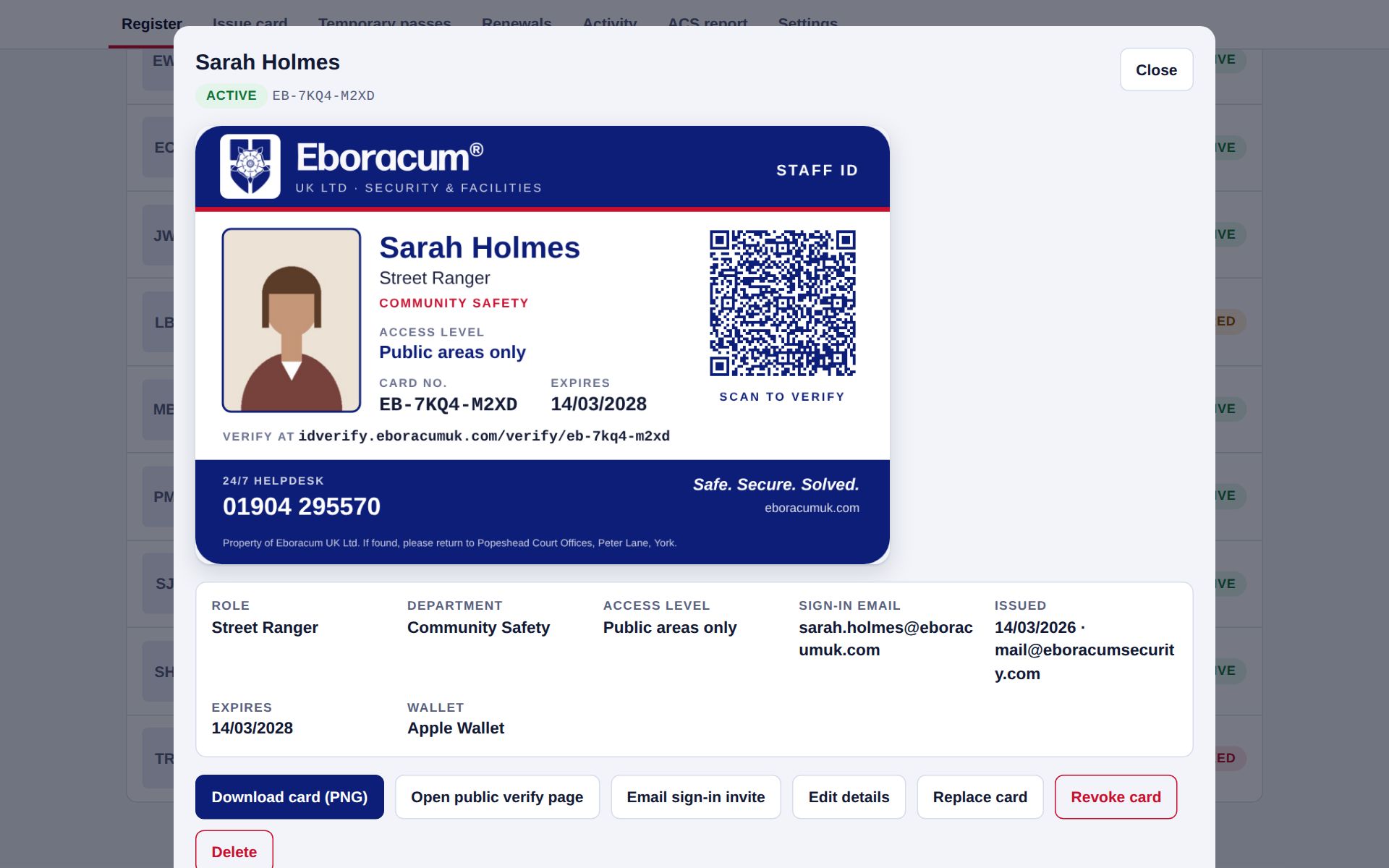
Every card carries the holder's photo, role, department, access level, a random card number and an expiry date, all under your branding. The QR code links to that card's live check.

  • Prints at true credit-card size, ten to an A4 sheet with cut marks, or straight to a card printer
  • Expired or withdrawn cards print with a stamp across them
  • Card numbers are random, so they can't be guessed in sequence
  • Your helpdesk number and a "property of" return address on every card

Why it helps: one design everywhere: on the phone, in print and in the wallet, so staff and clients learn to trust one look.

idverify.eboracumuk.com/admin
Admin view of Sarah Holmes's card, with her details, wallet status and actions

STOP 02 · THE SCAN

One scan, one clear answer

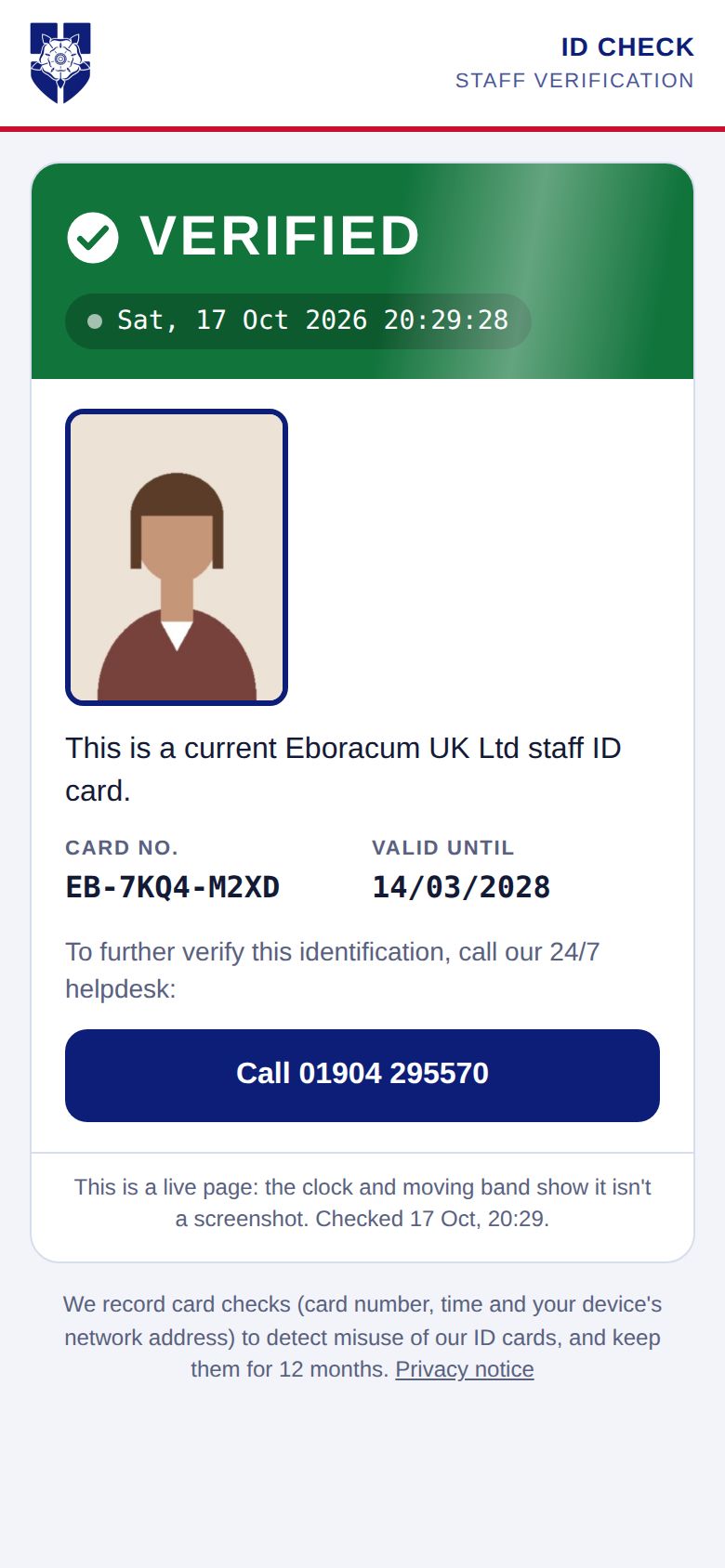
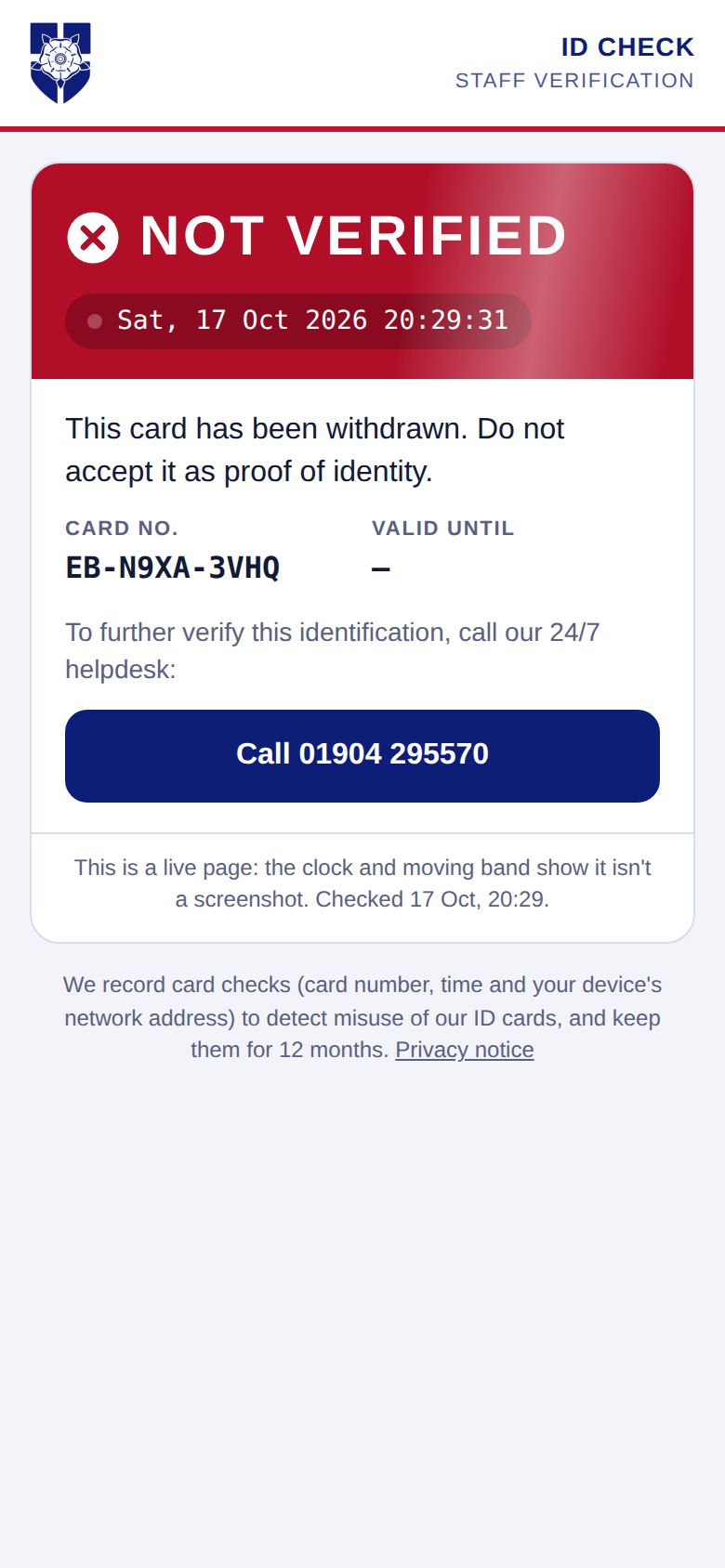
Point any phone camera at the QR code and the verify page opens with a plain result: green for a current card, red for one that's been withdrawn, amber when it's expired or checked offline. No app, no login, nothing to install.

  • A live clock and a moving band show it's a real check, not a screenshot
  • The holder's photo can be shown with a valid result, so the checker can match the face
  • Each check is logged. If someone checks a withdrawn, expired or unknown card, your office gets an alert.
  • Number-guessing is blocked: one device gets 40 checks every 10 minutes
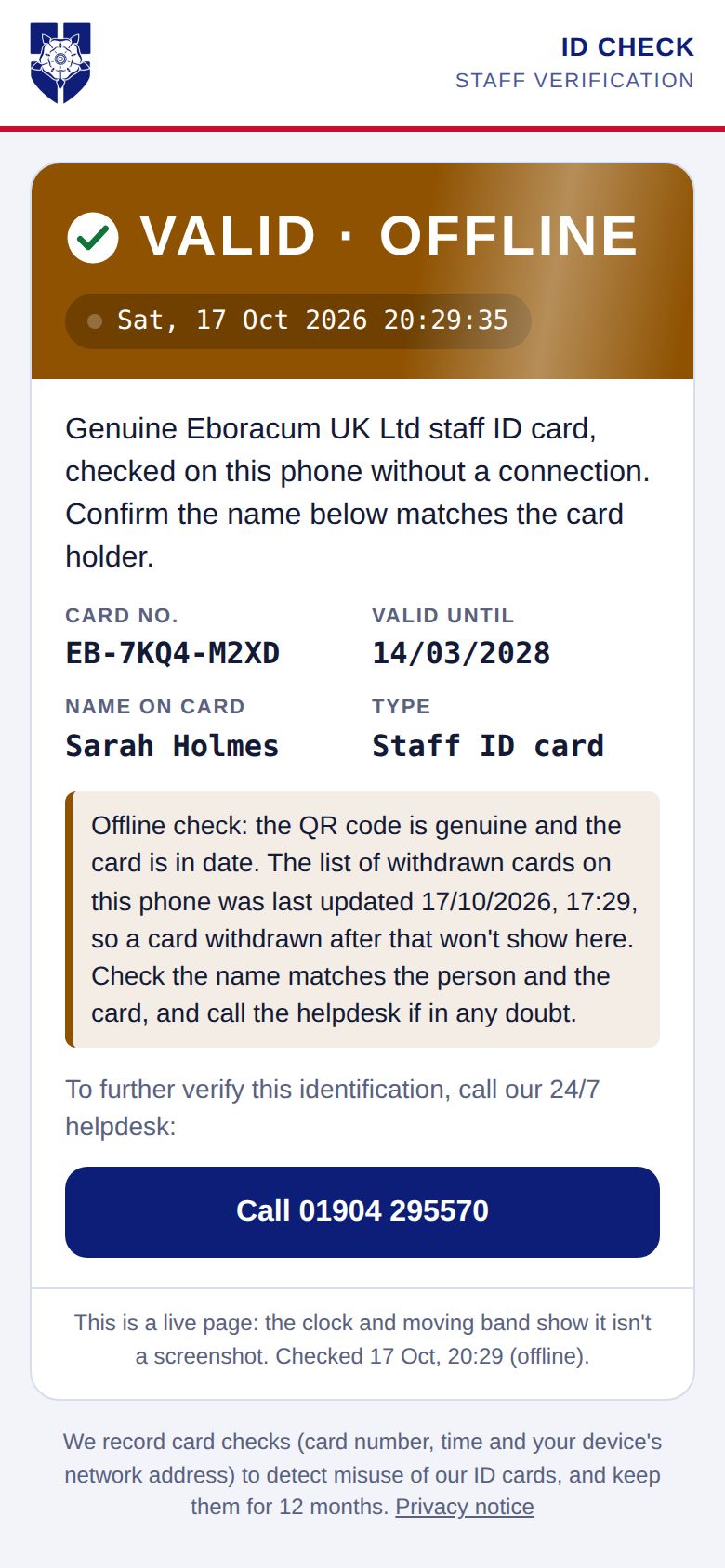
  • With no signal, the page checks the code's digital signature instead and says so clearly
Verify page showing VERIFIED with the holder's photo
Current cardGreen, with photo
Verify page showing NOT VERIFIED for a withdrawn card
Withdrawn cardRed, and your office is alerted
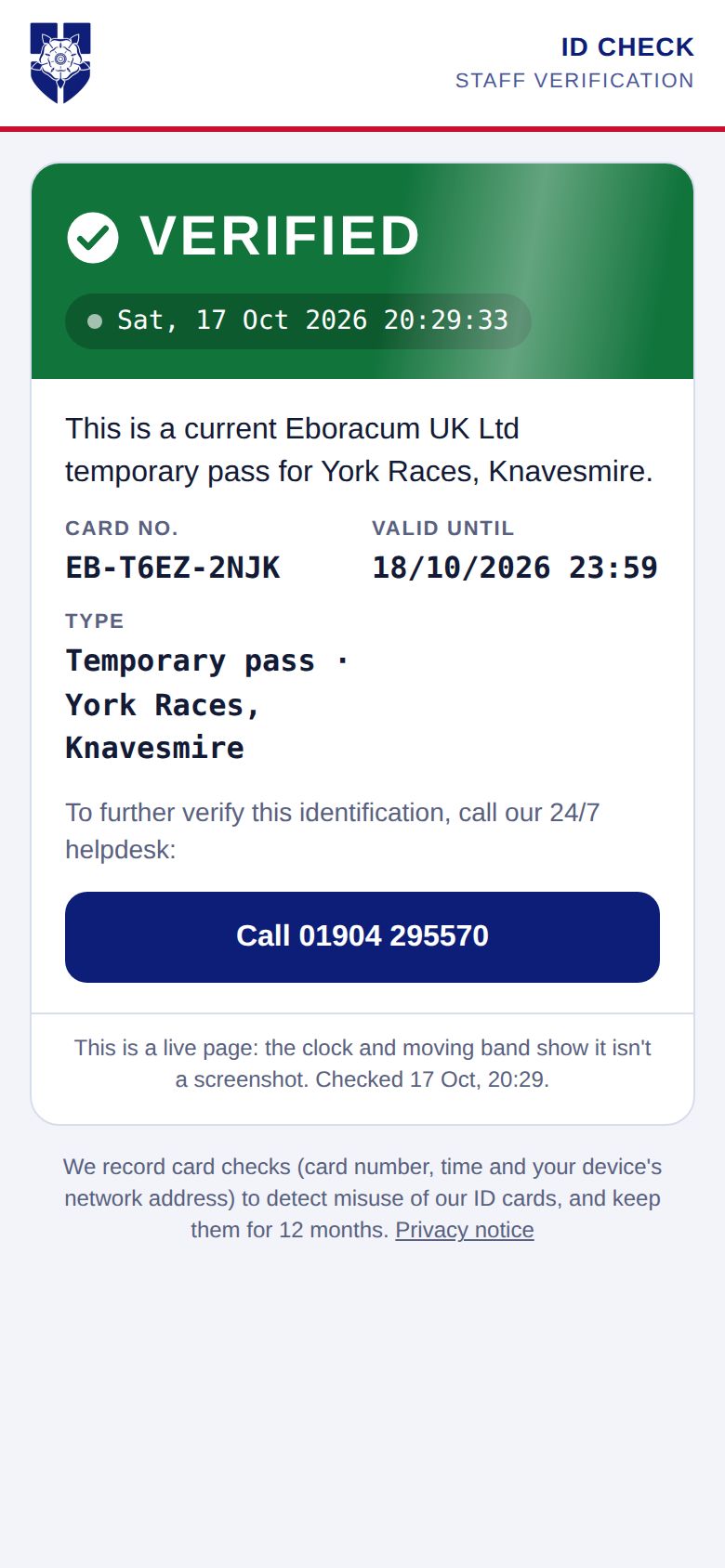
Verify page showing a valid temporary pass for York Races
Temporary passShows the event and end time
Verify page showing VALID · OFFLINE with the holder's name
No signalSigned offline check

STOP 03 · MY CARD

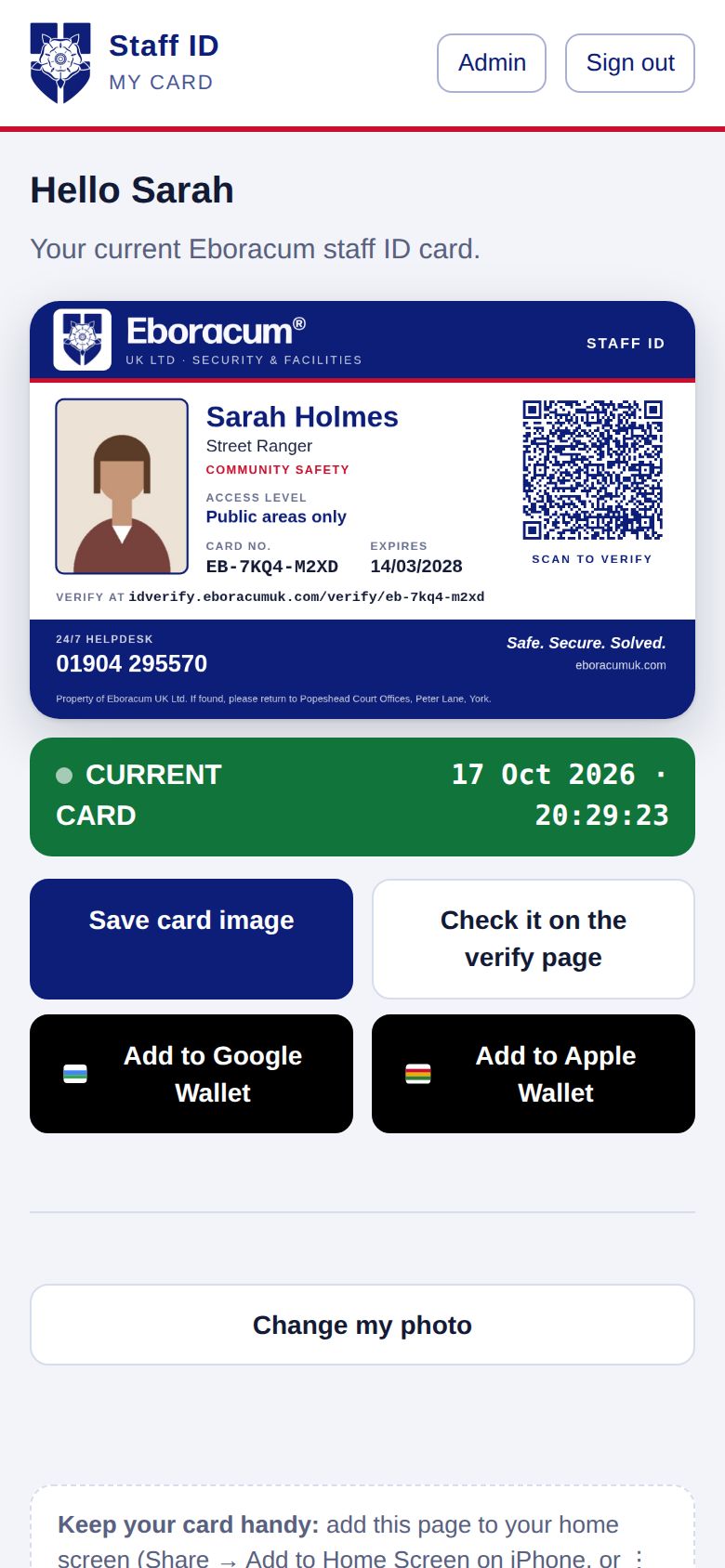
Staff carry their card on their phone

Staff sign in with a one-time link sent to their work email, so there are no passwords to forget. Their current card is there, ready to show or save.

  • Works offline for 30 days once opened, so it's there in a basement or a dead spot
  • Add it to the phone's home screen like an app
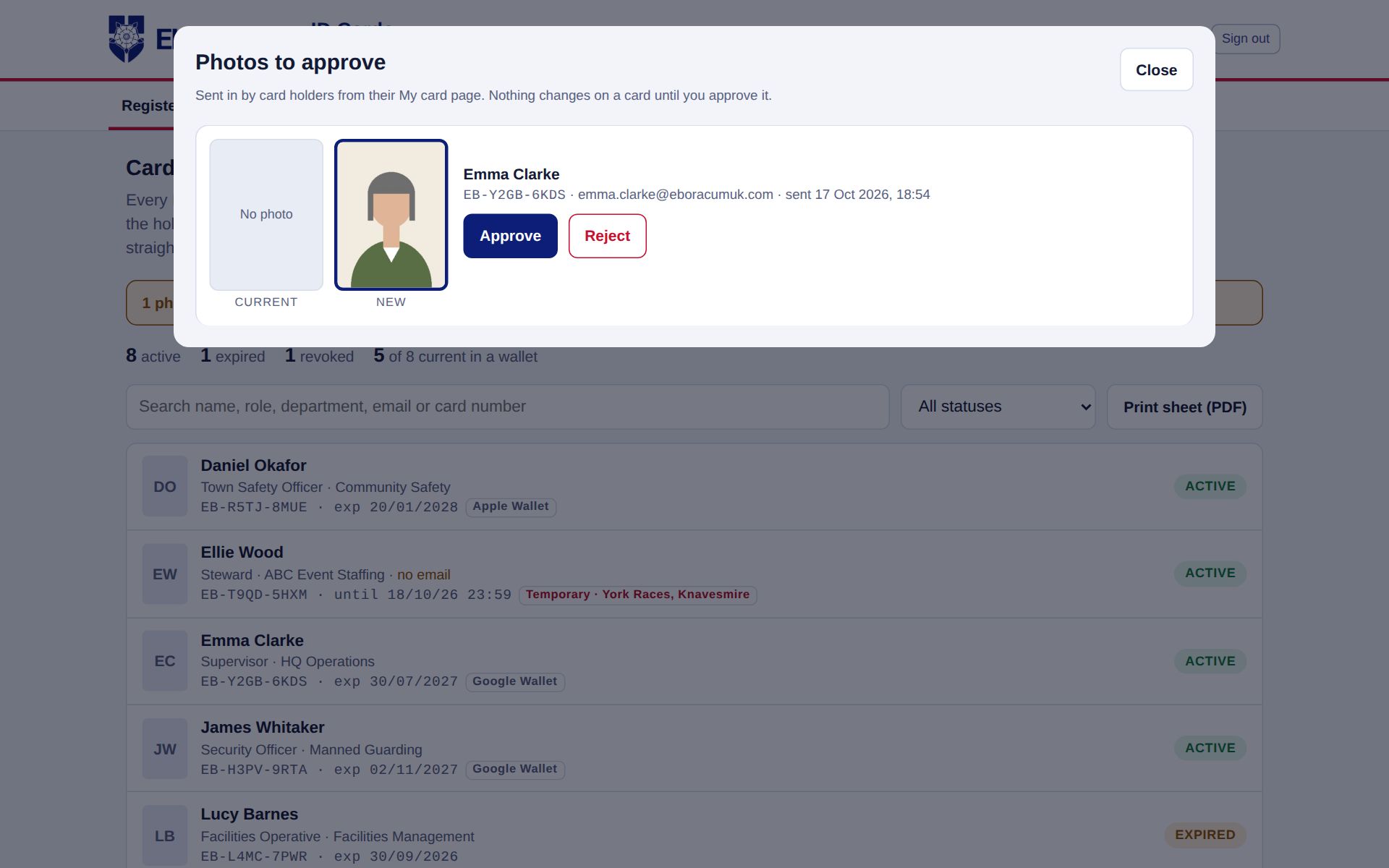
  • Staff send in their own photo; nothing changes until an admin approves it
  • One tap to add the card to Apple Wallet or Google Wallet

Why it helps: no lanyard left at home, no reprints for a new photo, and the card is always the current one.

My card page on a phone, with the card, a live status bar and wallet buttons

STOP 04 · WALLET PASSES

In Apple Wallet and Google Wallet

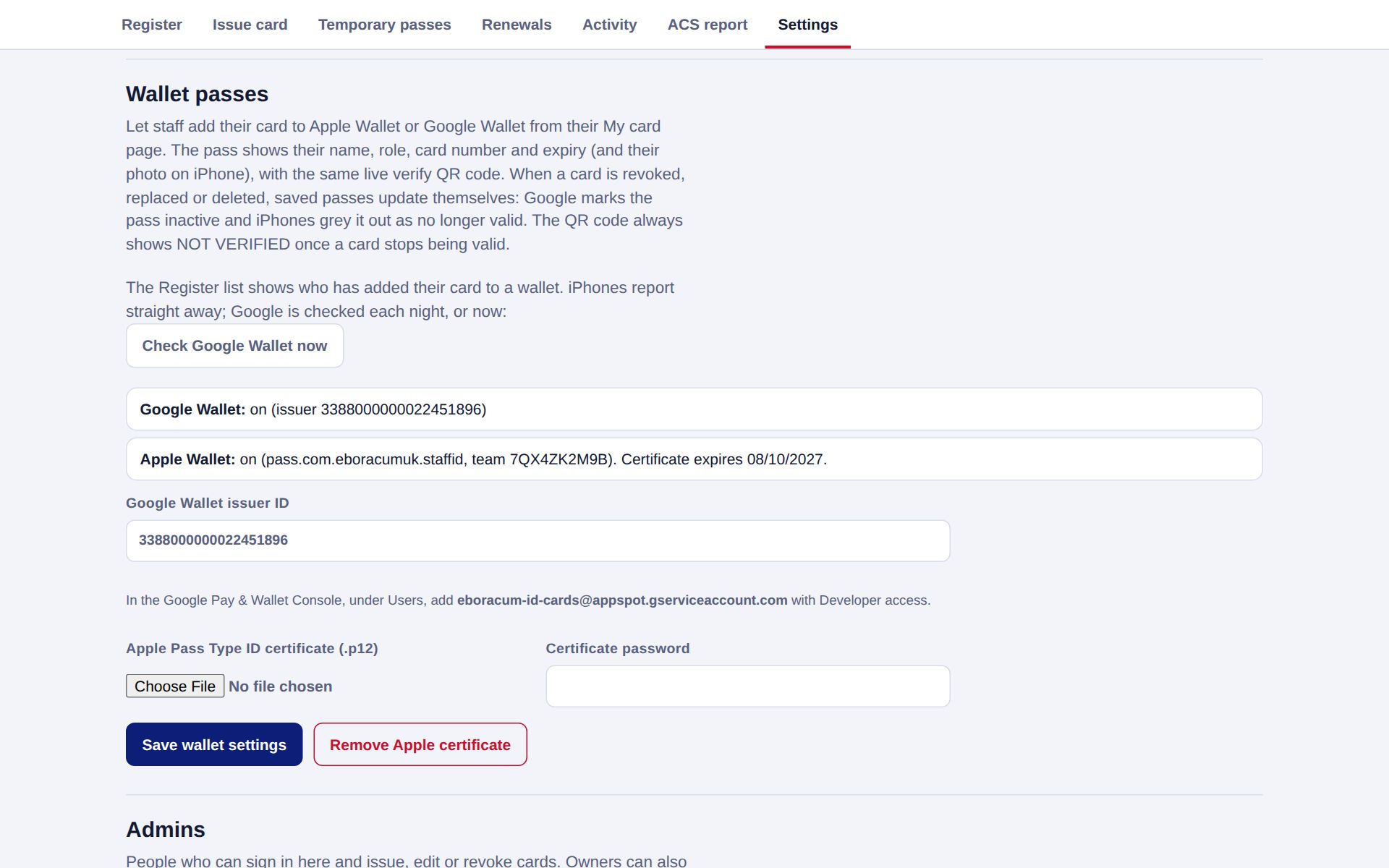
The card can live in the phone's own wallet, next to boarding passes and bank cards. It opens from the lock screen, shows the same live QR code, and carries the photo on iPhone.

  • When a card is withdrawn, replaced or deleted, the pass updates itself: iPhones grey it out and Google marks it inactive
  • Renewals and new photos update the pass automatically
  • The admin shows who has added their card to a wallet, so you can chase anyone who hasn't

Why it helps: staff always have their ID to hand, and a leaver's pass stops working on their own phone.

Expires
14/03/2028
Staff ID
Sarah Holmes
Role
Street Ranger
Card no.
EB-7KQ4-M2XD
Access
Public areas
EboracumUK LTD · STAFF ID
Staff ID
James Whitaker
Role
Security Officer
Expires
02/11/2027

Illustration of the two wallet passes, using sample data.

STOP 05 · THE REGISTER

Every card, its status and who's in a wallet

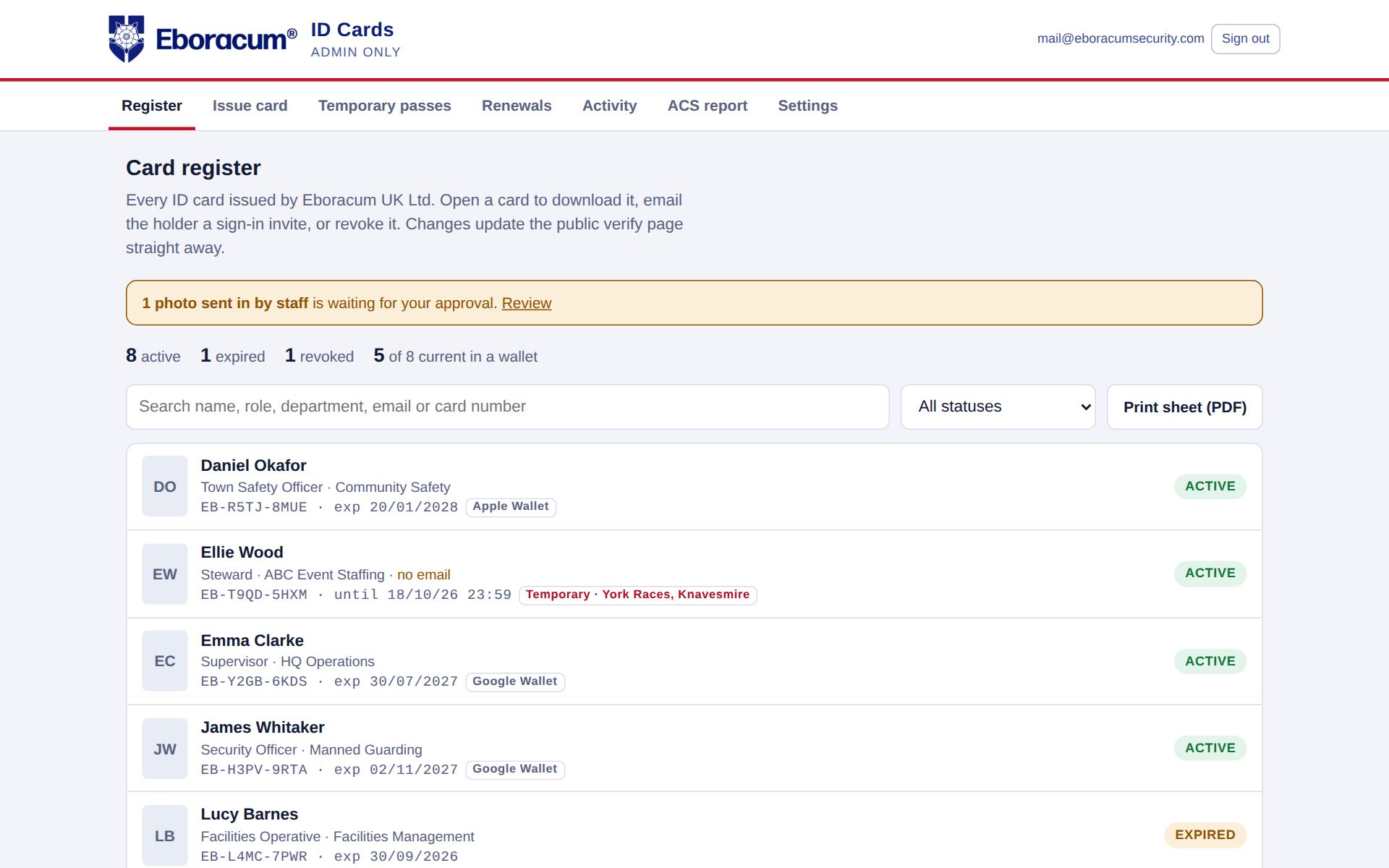
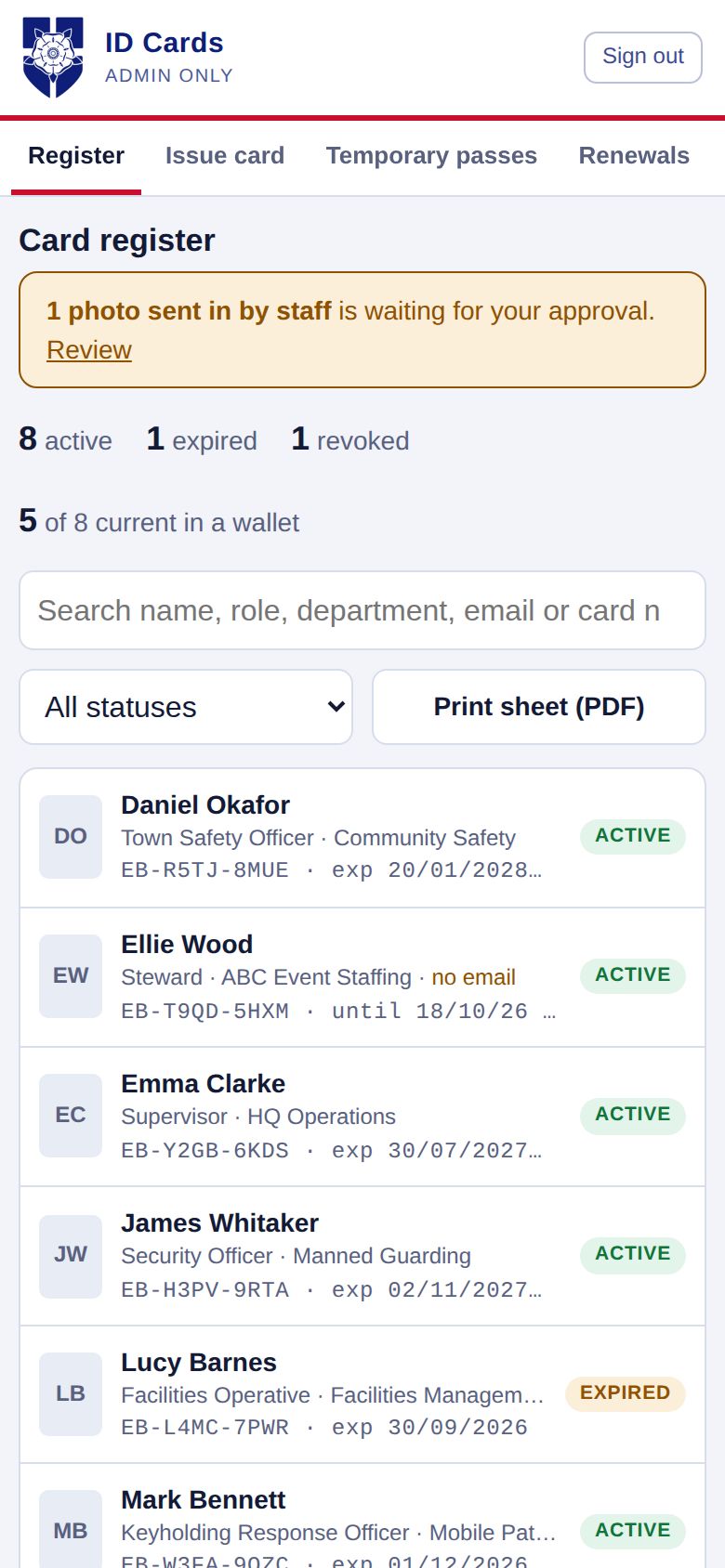
The register lists every card with its status, expiry and wallet tags. Search by name, role, department, email or card number, or filter to see exactly what you need.

  • Counts of active, expired and withdrawn cards at a glance
  • Filters for temporary passes, wallet take-up and cards not yet in a wallet
  • A banner when staff have sent in photos for approval
  • Print any set of cards as a PDF in one go
  • Works on a phone too, for supervisors out on site
idverify.eboracumuk.com/admin
Card register on desktop with status pills and wallet tags
Card register on a phone

STOP 06 · ISSUING & PHOTOS

Issue one card, or a whole team

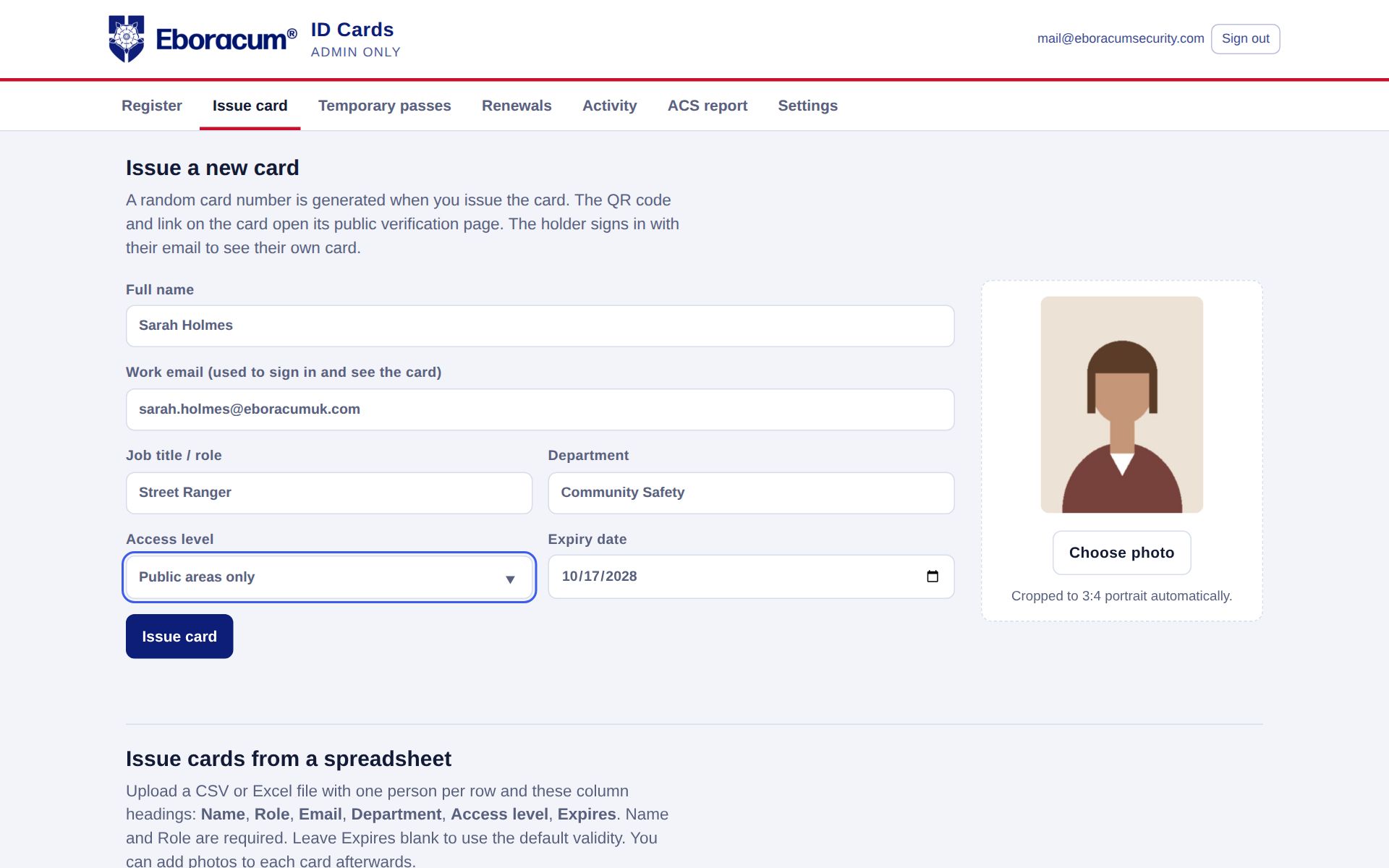
Fill in a short form, take or upload a photo (it's cropped to portrait automatically) and the card is live. For a new contract, upload a spreadsheet and issue everyone at once, with sign-in invites sent automatically.

  • Take the photo with the phone's camera straight from the form
  • Spreadsheet upload checks each row before anything is issued
  • Photos sent in by staff wait in a review queue: approve or reject with a reason
  • Photos of withdrawn cards are deleted automatically after a set period
idverify.eboracumuk.com/admin · Issue card
Issue card form with photo

STOP 07 · TEMPORARY PASSES

Event and agency staff, sorted in minutes

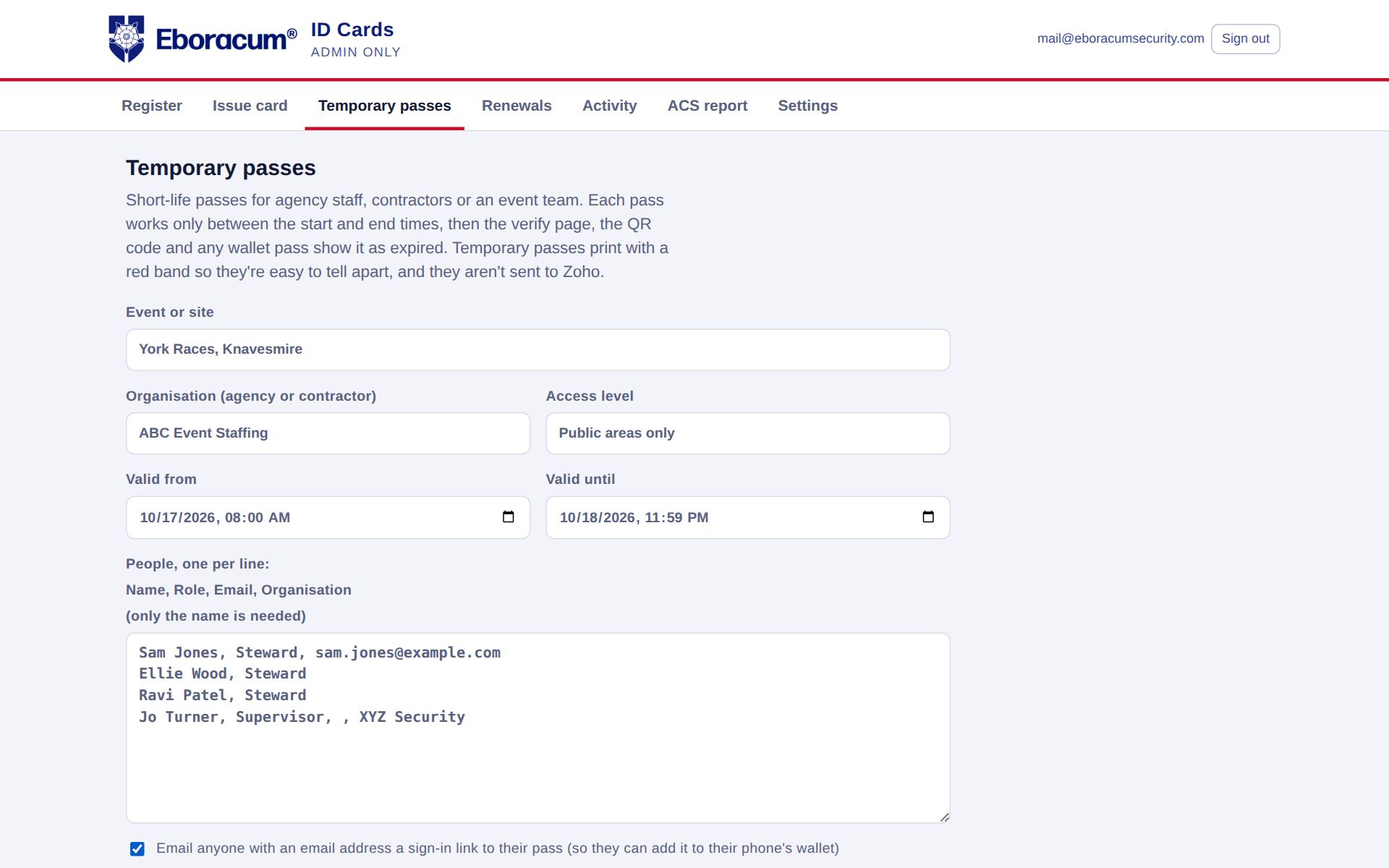
Name the event, set a start and end time, and paste in the list of people. Each person gets a pass with a red band that clearly reads TEMPORARY PASS, and it switches itself off at the exact minute you set.

  • Not valid before the start time, expired the minute after the end
  • Shows the event or site and the person's agency on the card and the verify page
  • Email each person a link so they can carry the pass on their phone
  • Print the whole batch in one click

Why it helps: no passes left behind after a race day or a festival, and nothing for you to chase back.

idverify.eboracumuk.com/admin · Temporary passes
Temporary passes form for York Races

STOP 08 · RENEWALS & LEAVERS

Nothing slips past its date

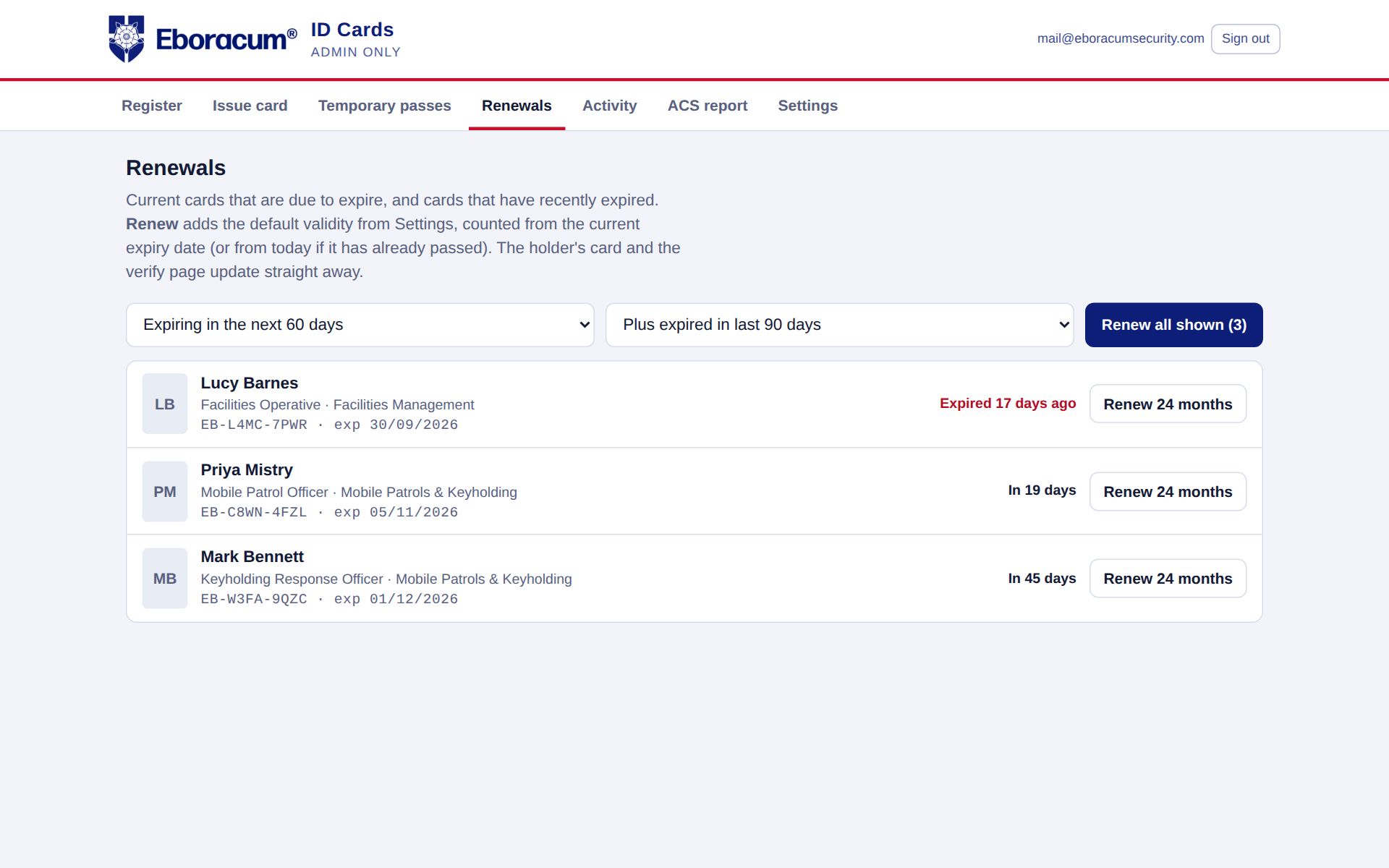
The Renewals tab lists cards due to expire and those that recently have. Renew one, or all of them in a click. When someone leaves, their card can be withdrawn automatically by your HR or CRM system, without anyone touching the admin.

  • Expiry reminders before a card runs out
  • Leavers marked inactive in Zoho CRM lose their card automatically
  • Connects to Principia, the central staff records system, over a secure API
  • Record the last working day, so you can prove how quickly access was removed
idverify.eboracumuk.com/admin · Renewals
Renewals list with cards due to expire

STOP 09 · ACTIVITY LOG

Who did what, and when

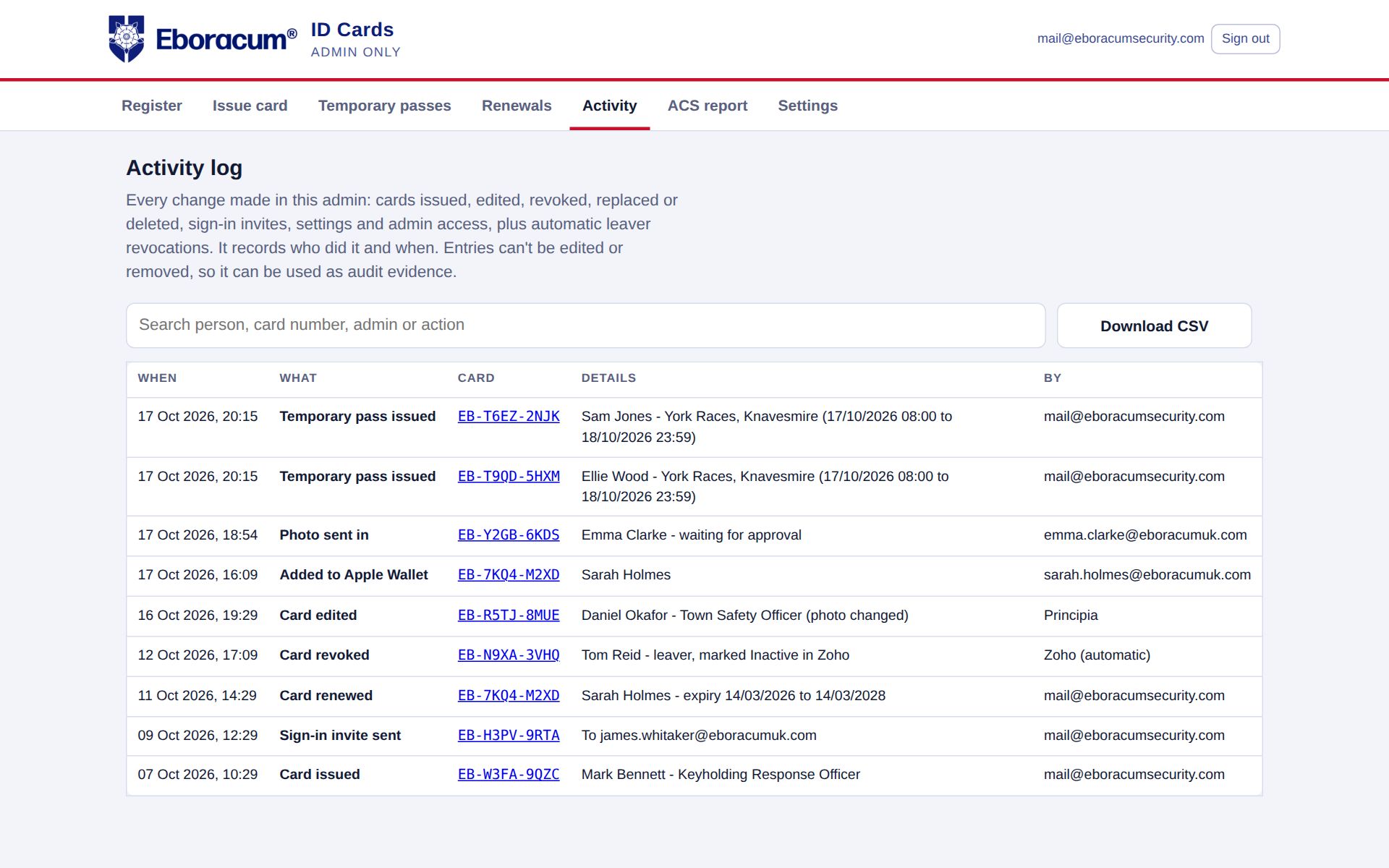
Every change is recorded: cards issued, edited, renewed, withdrawn, replaced or deleted, sign-in invites, photo approvals, settings and admin access. It covers automatic changes too, such as a leaver withdrawn by Zoho or an update from Principia.

  • Entries can't be edited or deleted
  • Search by person, card number, admin or action
  • Download the log as a CSV
  • Owner and admin roles, each signing in with their own email
idverify.eboracumuk.com/admin · Activity
Activity log with timestamps, actions and who made them

STOP 10 · ACS REPORT & SETTINGS

Audit-ready in one click

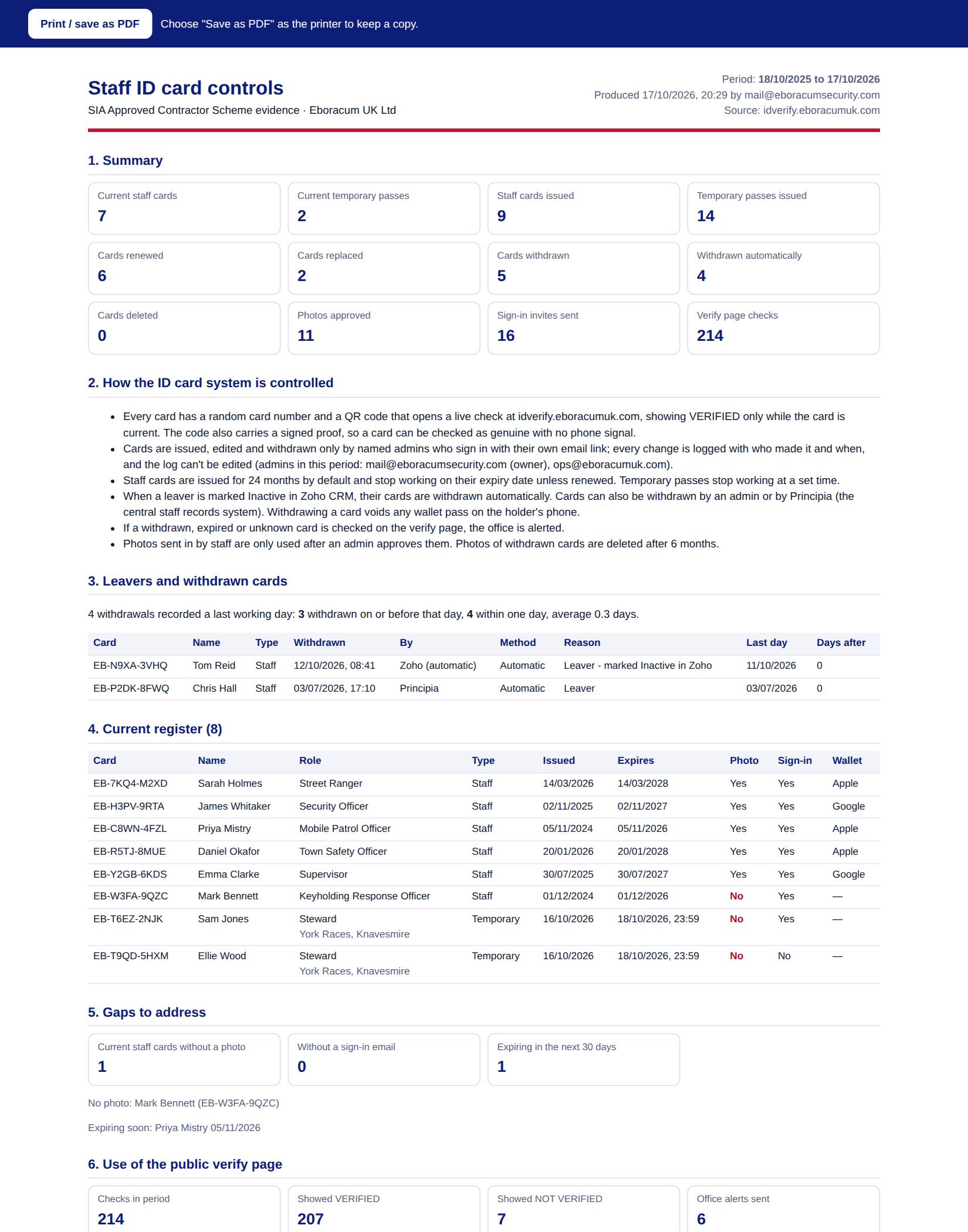
Choose a period and idverify builds a report for your SIA Approved Contractor Scheme assessment. It covers cards issued, renewed and withdrawn, how quickly leavers lost access, the current register with any gaps, and every check of a card that was no longer valid.

  • Opens as a printable page; save it as a PDF for your assessor
  • CSV files of the register, withdrawals and invalid-card checks
  • Settings for your logo, helpdesk number, verify message and validity period
  • Apple Wallet and Google Wallet set up from the same Settings screen
ACS ID card report
ACS evidence report with summary tiles and tables

For managers

Your everyday tasks, step by step

Sign in at idverify.eboracumuk.com/admin with your work email. You'll get a one-time sign-in link, so there's no password to remember.

Issue a new card
  1. Open Issue card.
  2. Enter name, work email, role, department and access level.
  3. Take or upload a photo.
  4. Click Issue card, then Email sign-in invite.
Issue a team from a spreadsheet
  1. On Issue card, click Download template.
  2. Fill in one person per row and upload it.
  3. Check the preview; any problem rows are flagged.
  4. Tick "Email each person" and click Issue cards.
Withdraw a card when someone leaves
  1. Open the card from the Register.
  2. Click Revoke card, add a reason and their last working day.
  3. The verify page shows NOT VERIFIED straight away and wallet passes are voided.
Set up event staff
  1. Open Temporary passes.
  2. Enter the event, agency, start and end time.
  3. Paste the names, one per line.
  4. Click Issue passes, then print the batch or email links.
Replace a lost card
  1. Open the card and click Replace card.
  2. A new card number is issued with the same details and photo.
  3. The old card immediately shows NOT VERIFIED.
Prepare for an ACS visit
  1. Open ACS report.
  2. Choose the period (the last 12 months by default).
  3. Click Create report and save it as a PDF.
  4. Download the CSVs if the assessor wants the detail.

For buyers

Know who's on your sites. Prove it to anyone who asks.

idverify replaces printed ID with a card that checks itself against your live register every time it's scanned. Here's what changes when you switch.

  1. IssueAdd a person, or a whole team from a spreadsheet. Their card is live in under a minute.
    Issuing a card in the admin
  2. CarryStaff open their card on their phone or in Apple or Google Wallet, or carry a printed card.
    A staff member's card on their phone
  3. ScanAnyone points a phone camera at the QR code and gets a clear answer straight away.
    The verify page showing VERIFIED

Leavers can't keep using their ID

Withdraw a card and it fails on the next scan, wallet passes included. Connect your HR or CRM and it happens automatically.

ManagersClients

Fakes don't pass a scan

Each QR code checks your own live register. A forged card, a copied number or a screenshot of an old check all show up straight away.

ClientsPublic

Nothing to install

Checkers use their phone camera. Staff sign in with an email link, with no passwords and no app store.

StaffClients

Temporary staff, sorted

Passes for agency or event staff switch on and off at the exact times you set, so there's nothing to collect afterwards.

Managers

Audit evidence on tap

An activity log that can't be edited, and a one-click ACS report showing how quickly leavers lost access and every check of an invalid card.

ManagersAssessors

Private and dependable

Hosted in London with daily backups. The public page shows the minimum, and a signed offline check keeps working with no signal.

Everyone

Try it

What does the person at the door see?

Pick a card and see what appears on the checker's phone.

Green and VERIFIED, with the holder's photo to match against the face in front of you.

The checker's phone showing the result

Before and after

Printed ID compared with idverify

When…A printed cardidverify
Someone leavesTheir card keeps working until you get it backIt fails on the next scan, automatically if your HR or CRM is connected
Someone forges a cardHard to spot at a glanceThe QR code checks your live register, so it fails
A client asks "do they work for you?"They phone the office and waitThey scan and know in seconds
Agency staff help at an eventPaper passes to hand out and collectTimed passes that switch themselves off
A card is lost or a photo changesReprint and post a new cardReplace it in two clicks, and the old card stops working straight away
The ACS assessor visitsPull records together by handOne report covering the whole period
Works withAny phone cameraApple WalletGoogle WalletZoho CRMPrincipiaA4 & CR80 card printersCSV & Excel
Book a walkthroughBack to the tour

Questions people ask

Does the person checking the card need an app or an account?

No. Any phone camera opens the verify page. Card numbers can also be typed in by hand.

What stops someone using a screenshot of a valid check?

The verify page shows a running clock and a moving band, so a still picture looks wrong. Each scan also runs a fresh check against the live register.

What happens with no phone signal?

The QR code carries a digital signature. The verify page can confirm the card is genuine and in date without a connection, against a list of withdrawn cards saved on that phone. The page says plainly that it was an offline check.

Where is the data held?

On Google Cloud in London. The card holder sees only their own card, and the public page shows only whether a card is valid, its number, expiry and (if you choose) the photo.

Can it carry our own branding?

The cards, wallet passes and pages carry the organisation's logo and colours, and the logo, helpdesk number and verify message can be changed in Settings. Ask us about setting idverify up for your organisation.

How do leavers lose their card?

An admin can withdraw it in two clicks, or it happens automatically when your HR or CRM marks them as a leaver. Either way, the verify page and any wallet pass change straight away.

Contact

See idverify with your own team

Tell us a little about your organisation and we'll arrange a walkthrough, or answer any questions about using idverify.

Email
mail@eboracumuk.com
Phone01904 295570
AddressEboracum UK Ltd, Popeshead Court Offices, Peter Lane, York YO1 8SU